
Interview Guide
Python Interview Cheat Sheet: 24 Core Concepts to Know
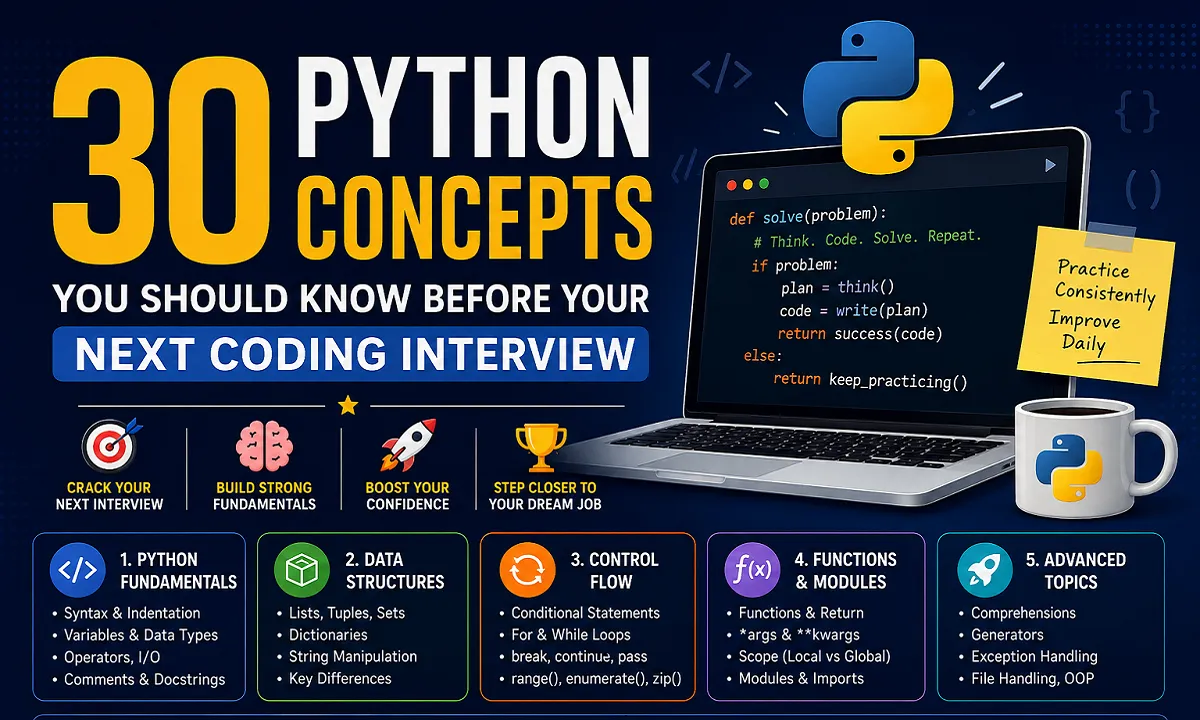
Python is one of the most popular programming languages for beginners and professional developers. It is widely used in web development, automation, data analysis, artificial intelligence, software development, and many other areas.
However, Python’s simple syntax does not necessarily mean Python interviews are always easy. Interviewers often test whether you understand the fundamentals and can apply them to practical programming problems.
If you are preparing for your first Python coding interview, you do not need to memorize every feature of the language. A strong understanding of the core concepts can give you a solid foundation and help you answer many common Python interview questions with confidence.
This guide covers 30 important Python concepts that students, freshers, self-taught programmers, and junior developers should understand before attending a coding job interview.
The goal is not simply to remember definitions. Try to understand how each concept works, when to use it, and why it matters in real-world programming.
What You Will Learn in This Python Interview Guide?
This cheat sheet focuses on core Python concepts that commonly matter in coding interviews. For broader interview preparation, see our job interview preparation guide.
| Category | Topics Covered |
|---|---|
| Python Fundamentals | Syntax, variables, data types, operators, input and comments |
| Python Data Structures | Lists, tuples, sets, dictionaries and strings |
| Python Control Flow | Conditions, loops and iteration tools |
| Python Functions and Modules | Functions, arguments, scope and imports |
| Advanced Python Topics | Comprehensions, generators, exceptions, files and OOP |
Python Fundamentals for Coding Interviews
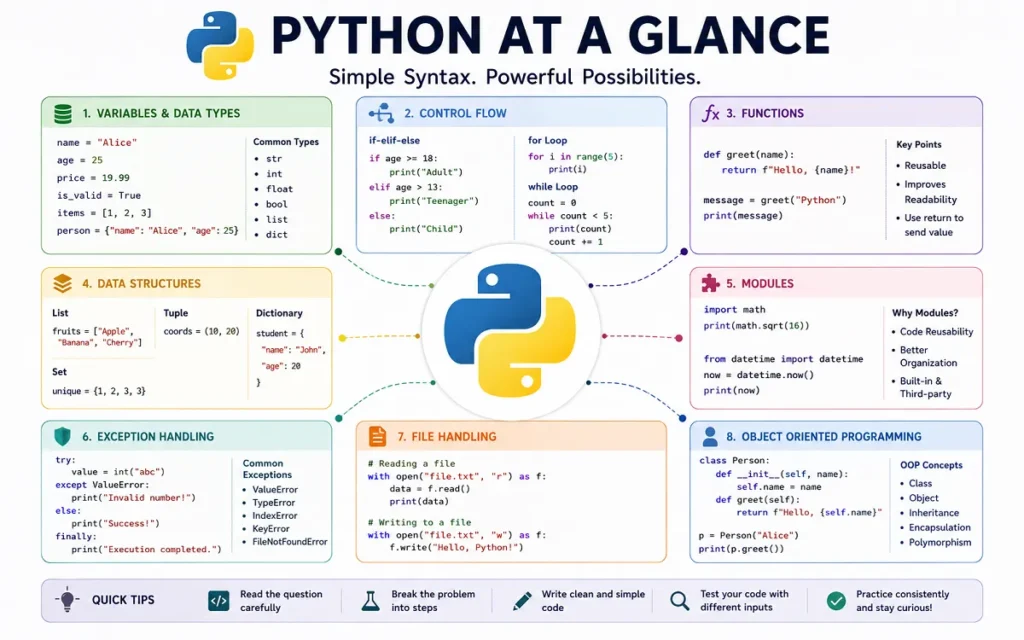
Python fundamentals are the building blocks of everything else you write in the language. Before moving to advanced topics, make sure you are comfortable with Python syntax, variables, data types, and basic operations.
1. Python Syntax and Indentation:
Python is known for its clean and readable syntax. One important feature that makes Python different from many other programming languages is its use of indentation.
Indentation means adding spaces at the beginning of a line to show that the line belongs to a particular block of code.
age = 20

if age >= 18:
    print("You are eligible")
The print() statement is indented because it belongs to the if block.
Why Python Indentation Is Important?
Python uses indentation to define blocks inside:
- Functions
- Conditional statements
- Loops
- Classes
- Exception handling blocks
Incorrect indentation can cause an error.
age = 20

if age >= 18:
print("You are eligible")
The code above will result in an IndentationError.
Common Beginner Mistake:
A common mistake is mixing tabs and spaces or forgetting to indent code inside a function or loop.
Python Interview Question:
Why does Python use indentation?
Python uses indentation to define blocks of code. It improves readability and replaces the braces commonly used in some other programming languages.
2. Variables and Data Types in Python:
A variable is a name used to store a value.
name = "John"
age = 25
salary = 45000.50
is_employee = True
Python automatically determines the type of data stored in a variable.
Common Python Data Types:
Some commonly used Python data types include:
strfor textintfor whole numbersfloatfor decimal numbersboolfor True or False valueslistfor collections of itemstuplefor ordered immutable collectionssetfor unique valuesdictfor key-value pairs
You can check a variable’s type using the type() function.
age = 25

print(type(age))
Understanding Dynamic Typing in Python:
Python is dynamically typed. You do not need to declare the data type of a variable before assigning a value.
value = 100
value = "Hello"
The same variable can refer to values of different types at different times.
Python Interview Tip:
Interviewers may ask how Python’s dynamic typing differs from statically typed languages. In Python, the type is associated with the object rather than permanently fixed to the variable name.
3. Type Casting in Python:
Type casting means converting one data type into another.
For example, user input is usually received as a string. If you want to perform mathematical operations, you may need to convert it to an integer.
age = "25"

new_age = int(age)

print(new_age + 5)
The output will be:
30Common Type Conversion Functions:
Python provides several built-in conversion functions.
int()
float()
str()
list()
tuple()
set()
For example:
price = 99.99

whole_price = int(price)

print(whole_price)
The result will be:
99Converting a float to an integer removes the decimal part.
Common Type Casting Mistakes:
Not every value can be converted successfully.
number = "hello"

int(number)
This will raise a ValueError because "hello" cannot be converted into an integer.
4. Python Operators:
Operators allow you to perform different operations on values and variables.
Arithmetic Operators:
Arithmetic operators are used for mathematical calculations.
a = 10
b = 5

print(a + b)
print(a - b)
print(a * b)
print(a / b)
Python also provides:
a // b   # Floor division
a % b    # Modulus
a ** b   # Power
Comparison Operators:
Comparison operators compare values and return either True or False.
a == b
a != b
a > b
a < b
a >= b
a <= b
Logical Operators:
Logical operators are commonly used with conditions.
age = 25
has_id = True

if age >= 18 and has_id:
    print("Access granted")
The main logical operators are:
andornot
Membership and Identity Operators:
The in operator checks whether a value exists inside a collection.
name = "Python"

print("P" in name)
Python also provides is and is not.
It is important to understand the difference between == and is.
==compares values.ischecks object identity.
5. Python Input and Output:
Python uses the input() function to receive information from users.
name = input("Enter your name: ")

print("Hello", name)
One important thing to remember is that input() returns a string.
age = input("Enter your age: ")If you want to use the input as a number, convert it.
age = int(input("Enter your age: "))Using print() and F-Strings:
The print() function displays output.
name = "Sarah"
age = 24

print(name, age)
F-strings provide a clean way to combine variables and text.
print(f"{name} is {age} years old")Common Beginner Mistake:
Many beginners forget that values returned by input() are strings.
This can cause problems.
age = input("Enter your age: ")

print(age + 5)
The code will fail because Python cannot directly add an integer to a string.
6. Comments and Docstrings in Python:
Comments help developers explain their code.
# Calculate the total employee salary
salary = hours * rate
Python ignores comments when executing the program.
Difference Between Comments and Docstrings:
Comments are generally used to explain individual parts of code.
Docstrings are commonly used to document functions, classes, and modules.
def calculate_total(price, quantity):
    """Return the total price of an order."""
    return price * quantity
Docstrings can help other developers understand the purpose of your code.
Python Fundamentals Interview Questions:
Here are some questions you may encounter:
- Why is indentation important in Python?
- What does dynamic typing mean?
- What is type casting?
- What is the difference between
==andis? - What data type does
input()return? - What is the difference between a comment and a docstring?
Python Data Structures for Interviews
Lists, tuples, sets and dictionaries are core Python data structures and are useful areas to revise before coding interviews.
Data structures allow you to organize and store information efficiently. Choosing the right data structure is an important programming skill.
7. Python Lists:
A list is an ordered and mutable collection.
fruits = ["Apple", "Banana", "Orange"]You can access items using their indexes.
print(fruits[0])Lists are mutable, which means you can change them after creation.
fruits[1] = "Mango"You can also add new items.
fruits.append("Grapes")Common Python List Methods:
Some useful list methods include:
append()
remove()
pop()
insert()
sort()
reverse()
When Should You Use a List?
Lists are useful when:
- The order of items matters
- You need to add or remove items
- Duplicate values are allowed
- The collection may change over time
For example:
products = ["Laptop", "Mouse", "Keyboard"]Common List Mistakes:
A common mistake is trying to access an index that does not exist.
fruits = ["Apple", "Banana"]

print(fruits[5])
This raises an IndexError.
8. Python Tuples:
A tuple is an ordered collection that is immutable.
coordinates = (10, 20)You can access tuple values.
print(coordinates[0])However, you cannot modify an existing item.
coordinates[0] = 50This will raise an error.
Why Tuples Are Immutable?
Immutability means the contents of a tuple cannot normally be changed after creation.
This can be useful when the data should remain fixed.
When Should You Use a Tuple?
Tuples can be useful for:
- Coordinates
- Fixed settings
- Data that should not be changed accidentally
- Returning multiple values from a function
9. Python Sets:
A set stores unique values.
numbers = {1, 2, 3, 3, 4}

print(numbers)
The duplicate value will not appear twice.
How Sets Handle Duplicate Values:
Sets automatically keep only unique elements.
For example:
visitors = {"John", "Sarah", "John", "Mike"}

print(visitors)
This can be useful when you need to remove duplicates.
Common Uses of Python Sets:
Sets are useful for:
- Removing duplicate values
- Checking membership efficiently
- Comparing groups of values
- Mathematical set operations
Example:
team_a = {"John", "Sarah", "Mike"}
team_b = {"Sarah", "David"}

print(team_a & team_b)
The result contains values common to both sets.
10. Python Dictionaries:
A dictionary stores information as key-value pairs.
employee = {
    "name": "John",
    "age": 30,
    "department": "IT"
}
You can access values using their keys.
print(employee["name"])You can add new information.
employee["salary"] = 50000Working With Dictionary Keys and Values:
Dictionaries are useful for structured information.
product = {
    "name": "Laptop",
    "price": 50000,
    "in_stock": True
}
The keys describe the values, making the data easier to understand.
Common Dictionary Methods:
Some useful dictionary methods include:
keys()
values()
items()
get()
pop()
update()
Common Dictionary Mistakes:
Accessing a missing key directly can raise a KeyError.
print(employee["email"])A safer approach is:
print(employee.get("email"))If the key does not exist, get() returns None by default.
11. Python String Manipulation:
Strings represent text.
message = "Python Programming"Strings are immutable, meaning individual characters cannot be directly changed.
Common Python String Methods:
Python provides many useful string methods.
text.lower()
text.upper()
text.strip()
text.replace()
text.split()
Example:
name = "  python developer  "

clean_name = name.strip().title()

print(clean_name)
String Indexing and Slicing:
You can access individual characters using indexes.
word = "Python"

print(word[0])
You can also extract part of a string using slicing.
word = "Python"

print(word[0:3])
The result is:
PytA common interview question is how to reverse a string.
word = "Python"

print(word[::-1])
12. Difference Between Lists, Tuples, Sets and Dictionaries:
Understanding the differences between these four data structures is important for Python interviews.
| Data Structure | Ordered | Mutable | Allows Duplicates | Key Features | Best Use Case |
|---|---|---|---|---|---|
| List | Yes | Yes | Yes | Flexible sequence | Data that may change |
| Tuple | Yes | No | Yes | Immutable sequence | Fixed data |
| Set | No positional indexing | Yes | No | Unique values | Removing duplicates |
| Dictionary | Preserves insertion order | Yes | Keys must be unique | Key-value pairs | Structured information |
When to Use Each Python Data Structure?
Use a list when you need an ordered collection that may change.
Use a tuple when the data should remain fixed.
Use a set when uniqueness is important.
Use a dictionary when values need meaningful keys.
Python Data Structures Interview Questions:
- What is the difference between a list and a tuple?
- Why are tuples immutable?
- How do sets remove duplicate values?
- Can a dictionary have duplicate keys?
- What is the difference between a list and a set?
- What happens when you access a missing dictionary key?
Python Control Flow Concepts
Control flow is another core interview area. If you are targeting software roles, see our UK software development career guide.
Control flow determines how a Python program makes decisions and repeats tasks.
13. Conditional Statements in Python:
Conditional statements allow a program to make decisions.
Python uses:
ifelifelse
score = 75

if score >= 90:
    print("Excellent")
elif score >= 50:
    print("Passed")
else:
    print("Failed")
Using if, elif and else:
Python checks the conditions from top to bottom.
Once a matching condition is found, the corresponding block is executed.
Common Conditional Statement Mistakes:
A common mistake is confusing = with ==.
if age == 18:
    print("Eligible")
== compares values.
= assigns a value.
14. Python for Loops and while Loops:
Loops allow you to repeat code.
When to Use a for Loop?
A for loop is commonly used when iterating through a sequence.
names = ["John", "Sarah", "Mike"]

for name in names:
    print(name)
When to Use a while Loop?
A while loop continues as long as a condition remains true.
count = 1

while count <= 5:
    print(count)
    count += 1
How to Avoid Infinite Loops?
Always make sure the condition inside a while loop eventually becomes false.
For example, this loop never changes count.
count = 1

while count <= 5:
    print(count)
This creates an infinite loop.
15. break, continue and pass in Python:
These three keywords are commonly used inside loops and control structures.
Difference Between break, continue and pass:
break stops the loop completely.
for number in range(10):
    if number == 5:
        break

    print(number)
continue skips the current iteration.
for number in range(5):
    if number == 2:
        continue

    print(number)
pass does nothing and can act as a placeholder.
def future_function():
    pass
An easy way to remember them is:
breakmeans stopcontinuemeans skippassmeans do nothing
16. Understanding the range() Function:
The range() function generates a sequence of numbers.
for number in range(5):
    print(number)
The output is:
0
1
2
3
4
Common range() Mistakes:
The ending value is not included.
range(1, 6)Produces:
1, 2, 3, 4, 5You can also provide a step.
for number in range(0, 10, 2):
    print(number)
17. Using enumerate() in Python:
enumerate() provides both the index and the value while looping.
names = ["John", "Sarah", "Mike"]

for index, name in enumerate(names):
    print(index, name)
Why enumerate() Is Useful?
Without enumerate(), beginners often create and manage a separate counter.
enumerate() makes this cleaner.
You can also choose a starting number.
tasks = ["Email client", "Write report", "Attend meeting"]

for number, task in enumerate(tasks, start=1):
    print(number, task)
18. Using zip() in Python:
The zip() function combines items from multiple iterables.
names = ["John", "Sarah", "Mike"]
scores = [85, 90, 78]

for name, score in zip(names, scores):
    print(name, score)
What Happens When zip() Receives Different Lengths?
By default, zip() stops when the shortest iterable ends.
names = ["John", "Sarah", "Mike"]
scores = [85, 90]

for name, score in zip(names, scores):
    print(name, score)
Only two pairs will be created.
Python Control Flow Interview Questions:
- What is the difference between
if,elif, andelse? - When should you use a
forloop? - What is the difference between
breakandcontinue? - Does
range(5)include the number 5? - Why is
enumerate()useful? - What happens when two lists of different lengths are passed to
zip()?
Python Functions and Modules
Functions, arguments, lambda expressions, modules and imports are important Python fundamentals. For a related career path, see our UK data engineering career guide.
Functions allow developers to organize reusable code. Modules help organize larger Python applications.
19. How to Define Functions in Python:
A function groups reusable code.
def greet():
    print("Hello!")
You can call the function using its name.
greet()Function Parameters and Arguments:
Functions can accept parameters.
def greet(name):
    print(f"Hello, {name}")
You can pass an argument when calling the function.
greet("John")Understanding return vs print:
A function can return a value.
def add_numbers(a, b):
    return a + b
result = add_numbers(5, 10)
print(result)print() displays information.
return sends a value back to the place where the function was called.
20. Default and Keyword Arguments:
A default argument provides a value when the caller does not supply one.
def greet(name="Guest"):
    print(f"Hello, {name}")
You can call it in different ways.
greet()
greet("John")
Positional vs Keyword Arguments:
Positional arguments depend on their position.
def create_user(name, age):
    print(name, age)

create_user("John", 25)
Keyword arguments explicitly identify the parameter.
create_user(age=25, name="John")Keyword arguments can make function calls easier to understand.
21. Understanding *args and **kwargs:
These allow functions to accept a flexible number of arguments.
def add_numbers(*numbers):
    return sum(numbers)
print(add_numbers(1, 2, 3, 4))Difference Between *args and **kwargs:
*args collects extra positional arguments.
def show_numbers(*numbers):
    print(numbers)
The values are collected into a tuple.
**kwargs collects keyword arguments.
def show_profile(**details):
    print(details)
The values are collected into a dictionary.
Example:
show_profile(
    name="John",
    age=25,
    city="London"
)
A simple way to remember the difference is:
*argsfor positional arguments**kwargsfor keyword arguments
22. Python Lambda Functions:
A lambda function is a small anonymous function.
square = lambda x: x * x

print(square(5))
When Should You Use Lambda Functions?
Lambda functions can be useful for short and simple operations.
For example:
numbers = [1, 2, 3, 4]

squared = list(map(lambda x: x * x, numbers))
When Are Normal Functions Better?
For complex logic, a normal function is usually easier to understand.
def calculate_salary(hours, rate):
    return hours * rate
Readable code is generally better than clever code that is difficult to maintain.
23. Local and Global Variables in Python:
A local variable is created inside a function.
def show_number():
    number = 10
    print(number)
The variable exists only within that function’s local scope.
Understanding Variable Scope:
A global variable is defined outside a function.
number = 20

def show_number():
    print(number)
The function can read the global variable.
Why Too Many Global Variables Can Cause Problems?
Python allows modification of a global variable using the global keyword.
count = 0

def increase_count():
    global count
    count += 1
However, excessive use of global variables can make code harder to understand and maintain.
Whenever possible, pass values to functions and return the results.
24. Python Modules and Import Statements:
A module is a Python file containing reusable code.
Python provides many built-in modules.
import math

print(math.sqrt(25))
Different Ways to Import Python Modules:
You can import an entire module.
import mathYou can import a specific item.
from math import sqrt

print(sqrt(25))
Why Python Modules Are Important?
Modules help organize larger applications.
For example:
project/
├── main.py
├── database.py
├── users.py
└── payments.py
Each file can handle a different responsibility.
This makes code easier to maintain and reuse.
Python Functions and Modules Interview Questions:
- What is the difference between
print()andreturn? - What are default arguments?
- What is the difference between positional and keyword arguments?
- What is the difference between
*argsand**kwargs? - When should you use a lambda function?
- What is the difference between local and global scope?
- What is a Python module?
Advanced Python Concepts for Interviews:
Once you understand the fundamentals, these concepts can help you write more efficient and better-organized Python code.
25. Python List Comprehensions:
A list comprehension provides a shorter way to create lists.
A traditional approach might look like this:
numbers = [1, 2, 3, 4]

squares = []

for number in numbers:
    squares.append(number * number)
The same result can be created using a list comprehension.
numbers = [1, 2, 3, 4]

squares = [number * number for number in numbers]
List Comprehensions With Conditions:
You can add conditions.
numbers = [1, 2, 3, 4, 5, 6]

even_numbers = [
    number
    for number in numbers
    if number % 2 == 0
]
When to Avoid List Comprehensions:
List comprehensions should improve readability.
Avoid making them too complicated. If a comprehension becomes difficult to understand, a normal loop may be better.
26. Python Dictionary Comprehensions:
Dictionary comprehensions provide a concise way to create dictionaries.
numbers = [1, 2, 3, 4]

squares = {
    number: number * number
    for number in numbers
}
The result will contain numbers as keys and their squares as values.
Practical Uses of Dictionary Comprehensions:
Suppose you want to apply a discount to product prices.
prices = {
    "Laptop": 50000,
    "Mouse": 1000
}

discounted_prices = {
    product: price * 0.9
    for product, price in prices.items()
}
Dictionary comprehensions can make simple transformations more concise.
27. Python Generators and the yield Keyword:
Generators produce values one at a time rather than creating all values immediately.
What Is a Python Generator?
A generator function usually uses the yield keyword.
def count_numbers():
    yield 1
    yield 2
    yield 3
You can iterate through the values.
for number in count_numbers():
    print(number)
Difference Between yield and return:
return ends a function and can send a value back.
yield produces a value while preserving the function’s state so it can continue later.
Generators vs Lists:
A list creates and stores its values.
numbers = [1, 2, 3, 4, 5]A generator can produce values as needed.
numbers = (number for number in range(5))Why Generators Can Save Memory:
Generators can be useful when working with large amounts of data because values are generated when needed rather than all being stored at once.
Common use cases include:
- Processing large files
- Working with large datasets
- Streaming information
- Processing sequences of data
28. Exception Handling in Python:
Programs can encounter unexpected situations. Exception handling helps you manage errors.
try:
    number = int(input("Enter a number: "))
except ValueError:
    print("Please enter a valid number.")
Understanding try and except:
The try block contains code that may produce an error.
The except block handles the error.
Using else and finally:
The else block runs if no exception occurs.
try:
    number = int("10")
except ValueError:
    print("Invalid number")
else:
    print("Conversion successful")
The finally block runs whether an exception occurs or not.
try:
    print("Trying")
except Exception:
    print("Error")
finally:
    print("This always runs")
Common Python Exceptions:
Some common exceptions include:
ValueErrorTypeErrorKeyErrorIndexErrorFileNotFoundErrorZeroDivisionError
Best Practices for Exception Handling:
Try to catch specific exceptions.
Instead of:
try:
    number = 10 / 0
except:
    print("Something went wrong")
Use:
try:
    number = 10 / 0
except ZeroDivisionError:
    print("You cannot divide by zero")
Specific exception handling makes debugging easier.
29. Python File Handling:
Python allows programs to read, write, and modify files.
How to Read Files in Python:
You can open a file in read mode.
file = open("example.txt", "r")

content = file.read()

print(content)

file.close()
How to Write Files in Python:
Write mode allows you to create or overwrite a file.
file = open("example.txt", "w")

file.write("Hello, Python!")

file.close()
How to Append Data to Files:
Append mode adds content to an existing file.
file = open("example.txt", "a")

file.write("\nNew line added")

file.close()
Why You Should Use the with Statement:
The recommended approach is using with.
with open("example.txt", "r") as file:
    content = file.read()
The file is automatically closed when the block is finished.
File handling is commonly used for:
- Log files
- Reports
- Configuration files
- Text processing
- Data storage
30. Object-Oriented Programming Basics in Python:
Object-oriented programming, commonly called OOP, organizes code using classes and objects.
Python Classes and Objects:
A class acts as a blueprint.
class Employee:
    pass
An object is created from the class.
employee = Employee()Attributes and Methods:
Attributes store information about an object.
Methods define what an object can do.
class Employee:

    def greet(self):
        print("Hello")
Understanding the init() Constructor:
The __init__() method is commonly used to initialize object attributes.
class Employee:

    def __init__(self, name, department):
        self.name = name
        self.department = department
Create an object:
employee = Employee("John", "IT")

print(employee.name)
Python Inheritance:
Inheritance allows one class to reuse behavior from another class.
class Person:

    def greet(self):
        print("Hello")
A new class can inherit from it.
class Employee(Person):
    pass
Now an Employee object can use the greet() method.
employee = Employee()

employee.greet()
Advanced Python Interview Questions:
- What is a list comprehension?
- When should you avoid using a list comprehension?
- What is a generator?
- What is the difference between
yieldandreturn? - Why can generators be memory efficient?
- What is the purpose of
finally? - Why should you use
withwhen working with files? - What is the difference between a class and an object?
- What is inheritance?
Quick Python Interview Preparation Checklist:
Use this checklist before attending a Python coding interview.
Python Fundamentals Checklist:
- Understand Python syntax and indentation
- Know common Python data types
- Understand type casting
- Know basic Python operators
- Understand input and output
- Know the difference between comments and docstrings
Python Data Structures Checklist:
- Create and modify lists
- Understand tuples and immutability
- Use sets for unique values
- Work with dictionaries
- Understand string operations
- Know when to use each data structure
Functions and Control Flow Checklist:
- Write conditional statements
- Use
forloops - Use
whileloops safely - Understand
break,continue, andpass - Define functions
- Use parameters and return values
- Understand
*argsand**kwargs - Understand local and global variables
Advanced Python Topics Checklist:
- Write readable list comprehensions
- Understand dictionary comprehensions
- Understand generators and
yield - Handle common exceptions
- Read and write files
- Understand classes and objects
- Know the basics of inheritance
Coding Interview Skills Checklist:
- Practice writing code without copying examples
- Read coding questions carefully
- Think about edge cases
- Use meaningful variable names
- Explain your approach clearly
- Practice Python coding questions regularly
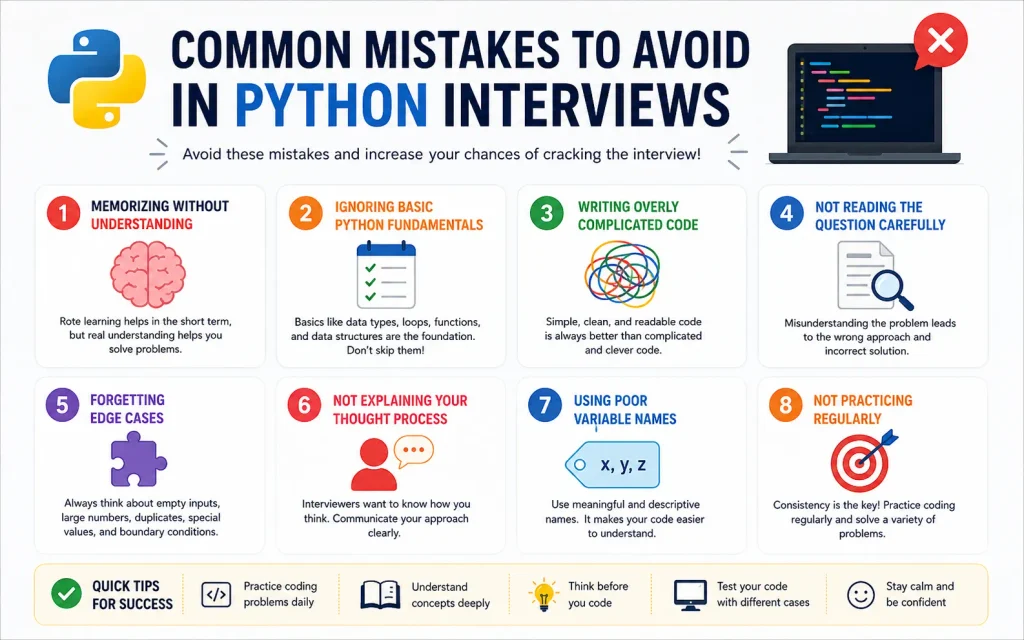
Common Mistakes to Avoid in Python Interview:
1. Memorizing Python Without Understanding the Concepts:
Memorizing definitions may help with basic theory questions, but interviews often test whether you can apply concepts.
For example, it is easy to memorize that a dictionary stores key-value pairs. It is more valuable to understand when a dictionary is a better choice than a list.
Practice using concepts in small programs.
2. Ignoring Basic Python Fundamentals:
Some beginners spend too much time studying advanced topics while forgetting the basics.
Interviewers may ask simple questions such as:
- What is the difference between a list and a tuple?
- What does
enumerate()do? - What is the difference between
breakandcontinue? - What is the difference between
returnandprint?
Strong fundamentals are essential.
3. Writing Overly Complicated Code:
Shorter code is not always better code.
For example:
def calculate_total(price, quantity):
    return price * quantity
This is simple and easy to understand.
Avoid writing complicated code just to demonstrate advanced Python knowledge.
4. Not Reading the Coding Question Carefully:
Before writing code, understand:
- What input is provided?
- What output is expected?
- Are duplicate values possible?
- Can the input be empty?
- Are there special conditions?
A correct solution to the wrong problem is still incorrect.
5. Forgetting Edge Cases:
Always consider unusual situations.
Examples include:
- Empty lists
- Missing dictionary keys
- Invalid user input
- Division by zero
- Duplicate values
- Large amounts of data
For example:
numbers = []

if numbers:
    print(max(numbers))
else:
    print("List is empty")
Thinking about edge cases shows that you understand practical programming.
6. Not Explaining Your Thought Process:
Technical interviews often evaluate your problem-solving approach.
When solving a question, explain:
- What the problem requires.
- What approach you will use.
- Why you selected that approach.
- What edge cases you considered.
Clear communication can help interviewers understand your reasoning.
7. Using Poor Variable Names:
Avoid unclear variable names when possible.
x = 50000
y = 10
z = x * y
A clearer version is:
monthly_salary = 50000
months = 10
total_salary = monthly_salary * months
Meaningful names make code easier to understand and maintain.
8. Not Practicing Python Regularly:
Reading about Python is useful, but programming requires regular practice.
Try building small programs involving:
- Lists
- Dictionaries
- Functions
- Loops
- File handling
- Exception handling
- Classes
You do not need to build a large application every time. Small projects can also improve your understanding.
Final Thoughts:
Preparing for a Python coding interview does not mean memorizing every function and feature in the language. The most important thing is to build a strong understanding of the fundamentals and know how to apply them to practical problems.
These 30 Python concepts provide a solid foundation for students, freshers, self-taught programmers, and junior developers.
Start with Python syntax, variables, data types, and operators. Then become comfortable with data structures, conditions, loops, and functions. Once those concepts become familiar, move on to generators, exception handling, file handling, and object-oriented programming.
Most importantly, practice regularly.
Write small programs. Make mistakes. Debug them. Try different approaches. Practice explaining your code aloud as if you were speaking to an interviewer.
Mastering these 30 concepts will not guarantee that every Python interview question will be easy. However, it will give you a much stronger foundation for understanding coding problems, writing cleaner code, and approaching Python interviews with greater confidence.
A good Python developer is not the person who memorizes the most syntax. A good developer understands the problem, chooses an appropriate solution, considers possible edge cases, and writes clear and reliable code.







How to Start a Career in Sports and Leisure in the UK
A practical guide to sports and leisure careers in the UK, covering jobs, qualifications, apprenticeships, skills, experience, CVs and career...


How to Start a Career in Travel and Tourism in the UK
Travel and tourism is a broad career sector with opportunities in travel agencies, airports, airlines, visitor attractions, tours, hotels, heritage...


How to Start a Career in Property and Real Estate in the UK
Property and real estate is a broad career field covering residential property, commercial buildings, land, development, valuation, lettings, property management...


How to Start a Career in Hospitality in the UK
Thinking about hospitality as a career in the UK? Compare hotel, restaurant and guest service roles, entry routes, skills, apprenticeships...


How to Start a Career in Retail in the UK
Thinking about a retail career in the UK? Compare retail roles, entry routes, apprenticeships, skills, experience, CV tips and ways...


How to Start a Career in Science and Research in the UK
Planning a science or research career in the UK? Compare career paths, qualifications, apprenticeships, skills and practical ways to get...


How to Start a Career in Law in the UK
Thinking about a career in law? This guide explains UK legal career routes, qualifications, solicitor and barrister pathways, apprenticeships, skills,...


How to Start a Career in Education in the UK
Thinking about a career in education? Compare teaching and non-teaching roles, qualifications, apprenticeships, experience, skills and practical steps for getting...


How to Start a Career in Marketing in the UK
Marketing is a broad career field that combines communication, creativity, research, data and business thinking. It includes traditional marketing as...


How to Start a Career in Healthcare in the UK
Healthcare is one of the UK’s broadest career areas. It includes doctors and nurses, but also healthcare assistants, laboratory staff,...


How to Start a Career in Human Resources (HR) in the UK
Photo by Vitaly Gariev on Unsplash Human resources, usually called HR, is a people-focused career that combines communication, organisation, business...


How to Start a Career in Construction in the UK
Construction is one of the UK’s broadest career sectors. It includes hands-on trades such as bricklaying, carpentry and plumbing, as...


How to Start a Career in Energy and Utilities in the UK
Planning a career in energy and utilities in the UK? See job options, apprenticeships, qualifications, skills and practical steps to...


How to Start a Career in Media and Communications in the UK
Planning a media and communications career in the UK? Compare job options, entry routes, apprenticeships, skills, experience and practical steps...


How to Start a Career in Environmental and Sustainability Jobs in the UK
Environmental and sustainability careers are becoming an important part of many UK workplaces. Jobs in this area can involve protecting...


How to Start a Career in Cybersecurity in the UK
Thinking about a cybersecurity career in the UK? Here is a practical guide to skills, qualifications, entry-level roles, applications and...


How to Start a Career in Engineering in the UK
Thinking about engineering as a career in the UK? Here is a practical guide to engineering fields, qualifications, apprenticeships, skills,...


How to Start a Career in Government and Public Services in the UK
Thinking about a career in government or public services? This guide covers job options, entry routes, apprenticeships, skills, applications and...


Rolls-Royce Internship UK: Eligibility, Opportunities & How to Apply
Find Rolls-Royce internships in the UK with practical guidance on eligibility, opportunities, applications, assessments, skills and preparation.


How to Start a Career in Transport and Logistics in the UK
Planning a career in transport and logistics in the UK? See entry-level roles, apprenticeships, qualifications, skills and practical steps to...
-
 Career3 years ago
Flexible Jobs for Older Adults in the UK: 7 Career Options
-
 How-to8 months ago
How to Use Google Gemini for Freelance Work and Career Skills
-
 Jobs8 months ago
Second Jobs in the UK: 15 Practical Ways to Earn Extra Income
-

 Career2 years ago
Free Job Posting Sites in the UK: Options for Employers
-
 How-to8 months ago
How to Build Passive Income: 20 Income-Producing Assets for Long-Term Financial Growth
-

 AI & Tools8 months ago
How to Use Google Gemini for Productivity at Work
-

 Job Description3 years ago
Support Worker Job Description: Duties, Skills, Salary and Career Guide UK
-

 AI & Tools8 months ago
ChatGPT vs Microsoft Copilot: Which AI Is Best for You?