
Social Media
Best YouTube Channels to Learn Tech Skills for Free
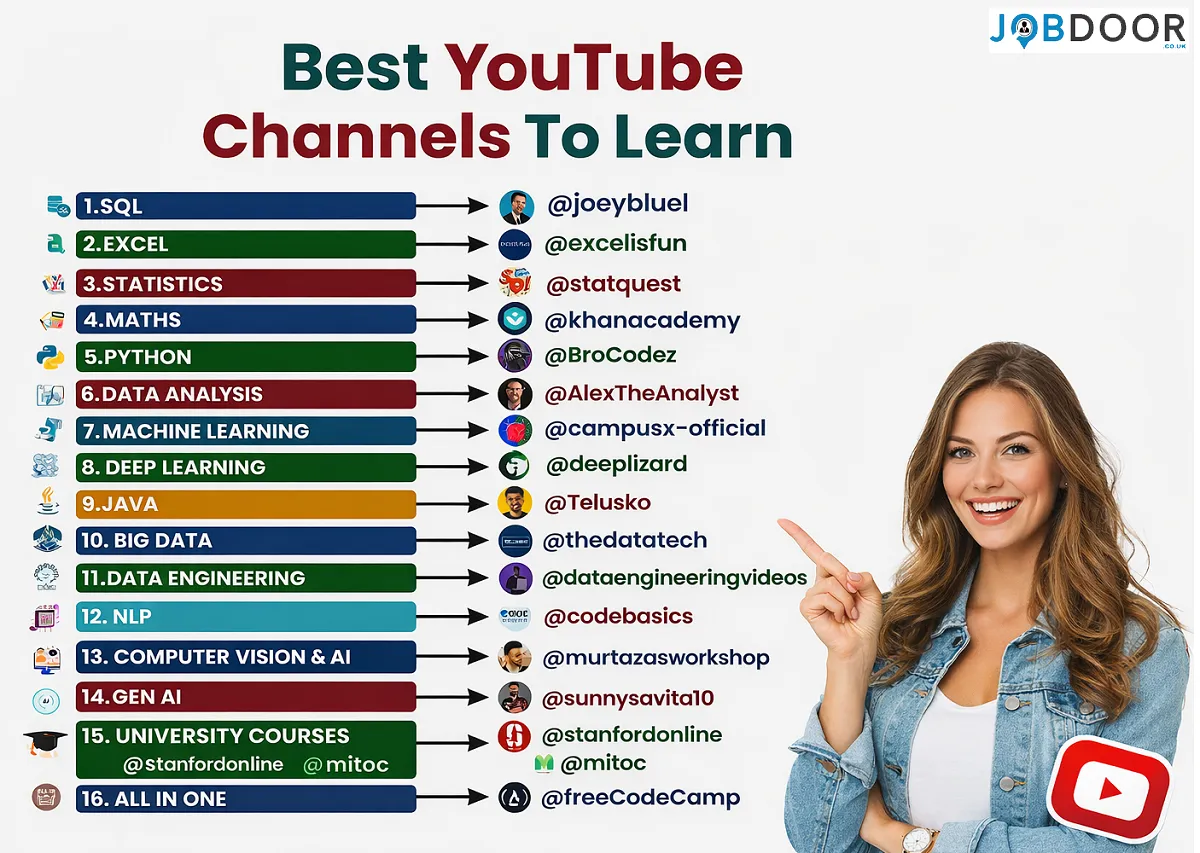
YouTube can be a useful place to build technology skills because it offers tutorials, project walkthroughs and introductions to specialised topics. However, the number of videos available can also make it difficult for beginners to choose a starting point.
The best approach is usually to choose a career direction first, learn the foundations required for that direction and practise what you study. Watching tutorials can introduce concepts, but practical work is what helps you understand how to use them.
Can You Learn Tech Skills on YouTube?
Yes, YouTube can support self-directed learning, particularly when you combine videos with documentation, exercises and practical projects. It is not a replacement for every form of education or professional training, but it can be a valuable free resource.
Its main advantages include the ability to pause, replay demonstrations and find content for different experience levels. The main challenge is that video quality, depth and accuracy can vary, so learners should check important information against reliable documentation where appropriate.
Best Tech Skills to Learn on YouTube
There is no single list of skills that suits every learner. Choose skills based on the type of work you want to do.
Programming
Programming can support careers in software development, automation, data work and other technical fields. Python and Java are examples of languages covered by many free learning resources.
SQL and Databases
SQL is used to work with relational databases and is relevant to data analysis, business intelligence and many software roles.
Excel and Data Tools
Spreadsheet skills can be useful in many roles. More advanced learning can include formulas, PivotTables, Power Query and data modelling.
Statistics and Data Analysis
Statistics can help you understand variation, probability and evidence when working with data. The level required depends on your career direction.
Data Science and Machine Learning
These areas usually require a combination of programming, data skills and mathematical understanding. Beginners may find it easier to build those foundations before moving into more specialised topics.
Recommended YouTube Channels for Learning Tech Skills
excelisfun
excelisfun provides a large collection of free lessons covering Excel, Power BI, formulas, functions, PivotTables, Power Query and data analysis. It can be useful for learners who want structured practice with spreadsheets and business data tools.
StatQuest
StatQuest focuses on explaining statistics, data science and machine-learning concepts in an accessible way. It can be useful when you want to understand the ideas behind technical methods rather than simply copy code.
Khan Academy
Khan Academy provides free educational resources across subjects including mathematics. It can be useful for strengthening foundations that support programming, statistics and technical study.
Alex The Analyst
Alex The Analyst focuses on data analytics and covers topics including SQL, Python and Excel. It can be useful for learners interested in building data-analysis skills and practical projects.
CampusX
CampusX publishes free content on data science, machine learning, Python, SQL and related data topics. It can be useful for learners who want to explore a broader data-focused learning path.
Choose Channels Based on Your Goal
Do not subscribe to dozens of channels and try to follow every tutorial. Choose one or two reliable sources for your current topic, complete a small section of learning and then practise before moving on.
A Simple Learning Roadmap for Beginners
Step 1: Choose a Career Direction
Before selecting a programming language or course, consider the type of work that interests you. For example, web development, data analysis and IT support require different starting points.
Step 2: Build the Foundations
Learn the basic concepts needed for your chosen direction before moving into advanced tools.
Step 3: Practise While You Learn
Pause tutorials and try the examples yourself. Change parts of the example and observe what happens.
Step 4: Build Small Projects
Projects help you connect separate lessons. Start with something small enough to finish and improve it as your skills develop.
Step 5: Keep Evidence of Your Work
Depending on your field, this might include a portfolio, project repository, written case study or examples you can discuss during an interview.
A Better Way to Use YouTube Tutorials
- Choose a specific topic or skill.
- Select a course or playlist with a clear structure.
- Take brief notes on important concepts.
- Practise the examples rather than only watching.
- Check official documentation when accuracy or current information matters.
- Build something independently using what you have learned.
How to Stay Consistent While Learning
Consistency does not require following the same number of study hours every day. Work schedules, family responsibilities and energy levels differ.
Choose a realistic study routine that you can maintain. Short, focused sessions can be useful when longer sessions are not practical. Review what you have completed and decide on the next clear step.
Common Mistakes Beginners Make
- Trying to learn too many unrelated skills at the same time.
- Watching tutorials without practising.
- Copying code without understanding the main idea.
- Moving to advanced topics before understanding the foundations.
- Changing learning resources every few days.
- Comparing your progress constantly with more experienced learners.
- Assuming a completed course alone guarantees employment.
How to Turn Learning Into Career Evidence
Employers may be interested in how you have used your skills, not only where you studied. Practical evidence can include projects, examples of problem-solving, relevant contributions or a portfolio that demonstrates your current ability.
When applying for roles, explain what you built, the tools you used, the problem you were trying to solve and what you learned from the process.
For help presenting your skills, read our How to Write a CV and Job Interview Preparation: Complete Guide.
Frequently Asked Questions
Are YouTube tech courses enough to get a job?
They can help you build knowledge and practical skills, but completing videos alone does not guarantee employment. Employers may also consider your practical ability, projects, experience and suitability for a particular role.
Which tech skill should a beginner learn first?
Start with a skill that supports the career direction you want to pursue. There is no single first skill that is right for everyone.
Should I learn several programming languages at once?
Beginners often find it easier to build confidence with one language or skill area before adding another, especially when the skills are not closely related.
How can I avoid tutorial overload?
Choose a structured course or playlist, define what you want to achieve and practise before moving to another resource.
Final Thoughts
YouTube can provide access to a wide range of technology education, but the most useful learning path is usually focused rather than endless.
Choose a direction, build the relevant foundations, practise regularly and create evidence of what you can do. Over time, completed projects and genuine understanding can become more valuable than simply watching a large number of tutorials.
For related guidance, read 7 Skills That Will Pay You Forever – Future-Proof Your Career, 5 Underrated Digital Skills You Can Learn at Home and How to Stay Employable: 12 Long-Term Career Strategies.










How to Start a Career in Sports and Leisure in the UK
A practical guide to sports and leisure careers in the UK, covering jobs, qualifications, apprenticeships, skills, experience, CVs and career...


How to Start a Career in Travel and Tourism in the UK
Travel and tourism is a broad career sector with opportunities in travel agencies, airports, airlines, visitor attractions, tours, hotels, heritage...


How to Start a Career in Property and Real Estate in the UK
Property and real estate is a broad career field covering residential property, commercial buildings, land, development, valuation, lettings, property management...


How to Start a Career in Hospitality in the UK
Thinking about hospitality as a career in the UK? Compare hotel, restaurant and guest service roles, entry routes, skills, apprenticeships...


How to Start a Career in Retail in the UK
Thinking about a retail career in the UK? Compare retail roles, entry routes, apprenticeships, skills, experience, CV tips and ways...


How to Start a Career in Science and Research in the UK
Planning a science or research career in the UK? Compare career paths, qualifications, apprenticeships, skills and practical ways to get...


How to Start a Career in Law in the UK
Thinking about a career in law? This guide explains UK legal career routes, qualifications, solicitor and barrister pathways, apprenticeships, skills,...


How to Start a Career in Education in the UK
Thinking about a career in education? Compare teaching and non-teaching roles, qualifications, apprenticeships, experience, skills and practical steps for getting...


How to Start a Career in Marketing in the UK
Marketing is a broad career field that combines communication, creativity, research, data and business thinking. It includes traditional marketing as...


How to Start a Career in Healthcare in the UK
Healthcare is one of the UK’s broadest career areas. It includes doctors and nurses, but also healthcare assistants, laboratory staff,...


How to Start a Career in Human Resources (HR) in the UK
Photo by Vitaly Gariev on Unsplash Human resources, usually called HR, is a people-focused career that combines communication, organisation, business...


How to Start a Career in Construction in the UK
Construction is one of the UK’s broadest career sectors. It includes hands-on trades such as bricklaying, carpentry and plumbing, as...


How to Start a Career in Energy and Utilities in the UK
Planning a career in energy and utilities in the UK? See job options, apprenticeships, qualifications, skills and practical steps to...


How to Start a Career in Media and Communications in the UK
Planning a media and communications career in the UK? Compare job options, entry routes, apprenticeships, skills, experience and practical steps...


How to Start a Career in Environmental and Sustainability Jobs in the UK
Environmental and sustainability careers are becoming an important part of many UK workplaces. Jobs in this area can involve protecting...


How to Start a Career in Cybersecurity in the UK
Thinking about a cybersecurity career in the UK? Here is a practical guide to skills, qualifications, entry-level roles, applications and...


How to Start a Career in Engineering in the UK
Thinking about engineering as a career in the UK? Here is a practical guide to engineering fields, qualifications, apprenticeships, skills,...


How to Start a Career in Government and Public Services in the UK
Thinking about a career in government or public services? This guide covers job options, entry routes, apprenticeships, skills, applications and...


Rolls-Royce Internship UK: Eligibility, Opportunities & How to Apply
Find Rolls-Royce internships in the UK with practical guidance on eligibility, opportunities, applications, assessments, skills and preparation.


How to Start a Career in Transport and Logistics in the UK
Planning a career in transport and logistics in the UK? See entry-level roles, apprenticeships, qualifications, skills and practical steps to...
-
 Career3 years ago
Flexible Jobs for Older Adults in the UK: 7 Career Options
-
 How-to8 months ago
How to Use Google Gemini for Freelance Work and Career Skills
-
 Jobs8 months ago
Second Jobs in the UK: 15 Practical Ways to Earn Extra Income
-
 Career2 years ago
Free Job Posting Sites in the UK: Options for Employers
-
 How-to8 months ago
How to Build Passive Income: 20 Income-Producing Assets for Long-Term Financial Growth
-
 AI & Tools8 months ago
How to Use Google Gemini for Productivity at Work
-

 Job Description3 years ago
Support Worker Job Description: Duties, Skills, Salary and Career Guide UK
-
 AI & Tools8 months ago
ChatGPT vs Microsoft Copilot: Which AI Is Best for You?