
Career
Digital Product Ideas: 25 Practical Products You Can Create and Sell
Explore 25 practical digital product ideas, how to validate an idea, create a useful product, choose where to sell and build a simple launch plan.
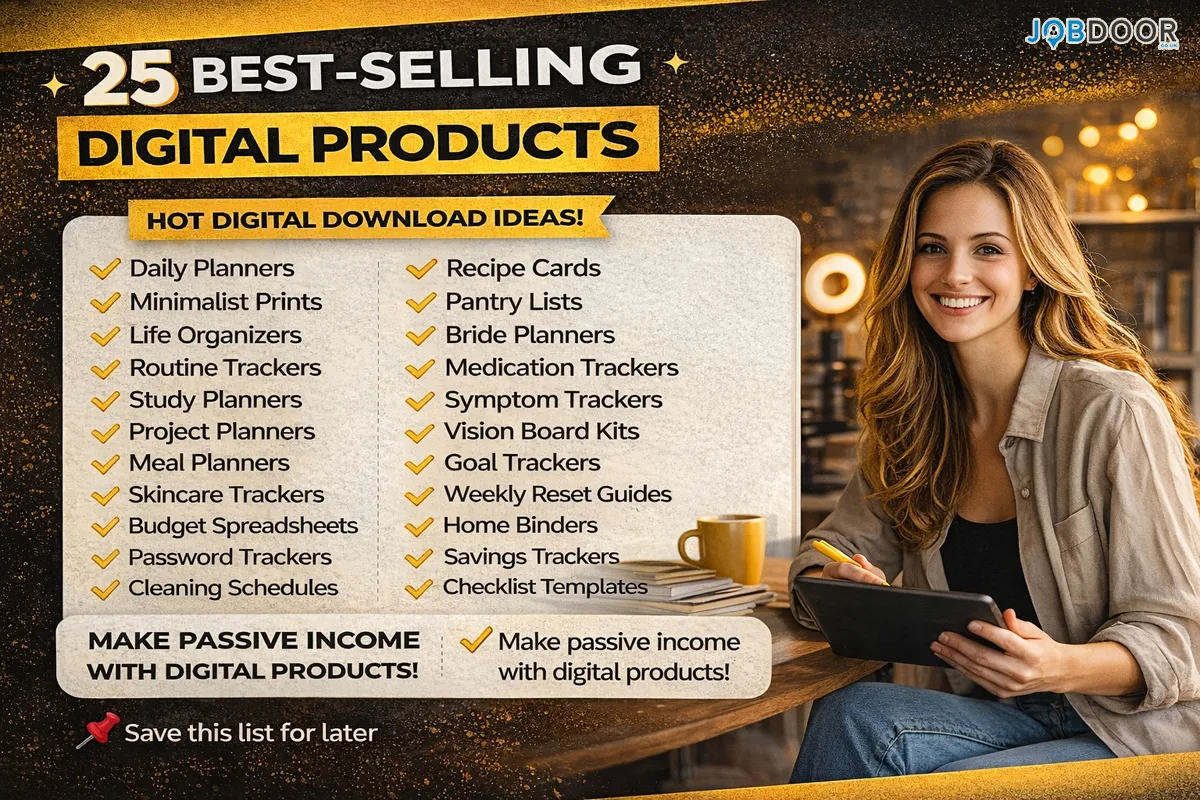
Digital products can be a practical way to turn a useful skill, idea or repeatable solution into something you can sell online. But the strongest products are not simply files that look attractive. They solve a clear problem for a specific type of buyer.
This guide covers 25 digital product ideas, how to choose one, how to validate it before spending too much time creating it, and how to build a simple selling workflow.
What Makes a Digital Product Worth Selling?
A digital product can be a downloadable file, template, spreadsheet, guide, course, resource library or another digital asset that provides useful information or saves the buyer time.
- It solves a specific problem.
- It is easy for the buyer to understand and use.
- It provides a clear benefit compared with creating the solution from scratch.
- It can be updated when the topic or customer need changes.
- It is aimed at a defined audience rather than everyone.
There is also an important distinction between repeatable sales and truly passive income. A product may be delivered automatically, but successful sellers still spend time on marketing, customer support, updates and product improvement.
25 Practical Digital Product Ideas
These ideas cover different skills and audiences. Use them as starting points rather than assuming every product will sell equally well.
1. Practical Ebooks and Short Guides
Turn knowledge about a focused topic into a useful guide. Strong examples solve one problem instead of trying to cover an entire subject.
2. Resume and CV Templates
Create clean, editable templates for students, graduates, career changers or specific professions. Include instructions so buyers know how to adapt them.
3. Job Search Checklists
A structured checklist can help job seekers organise applications, networking, interview preparation and follow-ups.
4. Study Planners
Students may pay for practical planning tools that help them organise subjects, assignments, revision sessions and deadlines.
5. Notion Templates
Build templates for project management, content planning, personal organisation, study tracking or freelance work. If you are interested in digital design, our guide to starting a UX and UI design career in the UK can help you understand the skills behind this type of work.
6. Spreadsheet Templates
Useful spreadsheets can cover budgeting, project tracking, sales pipelines, content calendars, inventory or business reporting.
7. Canva Templates
Create editable social posts, presentations, worksheets, flyers, planners or business documents for a defined audience. These products can also build practical digital skills that employers value.
8. Social Media Content Packs
Offer caption frameworks, content calendars, post ideas and editable designs for small businesses or creators.
9. Content Planning Systems
Combine topic ideas, publishing schedules, keyword notes and performance tracking into one practical system.
10. Freelance Business Templates
Freelancers may benefit from proposal templates, client onboarding checklists, project briefs, invoice trackers and service questionnaires.
11. Budget and Money Trackers
Simple budgeting tools can help users track income, recurring expenses, savings goals and spending categories.
12. Meal Planning Templates
Meal planners, shopping lists and recipe organisers can save busy households time each week.
13. Wedding Planning Templates
Wedding budgets, vendor checklists, guest trackers and planning timelines can be useful for couples who want to organise the process themselves.
14. Small Business Checklists
Turn repeatable business processes into checklists for onboarding, content publishing, customer follow-up, administration or routine operations.
15. Digital Journals
Journals can focus on planning, reflection, gratitude, goal setting or another clear use case. Keep the experience simple and easy to navigate.
16. Printable Worksheets
Worksheets can support education, planning, business processes, creative projects and many other practical activities.
17. Educational Flashcards and Revision Packs
Subject-specific revision materials can be useful when they are accurate, clearly organised and designed for a defined level or exam.
18. Presentation Templates
Create editable presentation systems for sales teams, students, trainers, consultants or small businesses.
19. Photography Presets and Editing Resources
Photographers and creators can package presets, editing workflows, brushes or other original resources that help customers achieve a particular look.
20. Stock Photo Collections
Original photographs can be packaged for specific commercial or creative uses, provided you have the rights to sell and license the material.
21. Online Mini-Courses
A short course can teach one focused skill without the time commitment of a large programme. Clear outcomes matter more than course length.
22. Video Tutorial Libraries
Step-by-step video lessons can work well for software, creative skills, professional workflows and practical hobbies.
23. Prompt and Workflow Packs
Instead of selling a random collection of AI prompts, create task-specific workflows with instructions, examples, review steps and guidance on when to use them.
24. Business Resource Kits
Combine related templates, checklists, guides and worksheets into a resource kit for one business problem or customer type.
25. Industry-Specific Toolkits
Create a practical toolkit for a defined profession or industry, such as a freelancer onboarding kit, tutor planning pack or social media system for local businesses.
How to Choose the Best Idea
The biggest mistake is choosing an idea because it looks popular. A better approach is to match your skills, a real customer problem and a format you can produce well.
- Start with what you know. List problems you have solved at work, in study, in business or in everyday life.
- Identify a specific buyer. “Small business owners” is broad. “Freelance designers who need a client onboarding system” is more useful.
- Check existing demand. Look at marketplace listings, search results, community questions and competitor products.
- Find the gap. Your product could be simpler, more specialised, easier to use or better suited to a particular audience.
- Choose a manageable format. A useful 10-page guide may be better than an unfinished 100-page course.
Validate the Idea Before Building Everything
Do not spend weeks creating a product before checking whether people want it. Start with a small version.
- Ask potential buyers what they currently use.
- Read questions and complaints in relevant communities.
- Review competing products and customer feedback.
- Create a simple sample or preview.
- Ask whether the proposed solution would save time or solve a real problem.
💡 Practical tip: If people cannot explain why they need the product, the product idea probably needs a clearer audience or outcome.
How to Create a Digital Product With a Simple Workflow
1. Define the Outcome
Write one sentence explaining what the buyer should be able to do after using the product.
2. Build the Smallest Useful Version
Include the essential information, templates or tools needed to achieve the promised outcome. Remove anything that adds length without adding value.
3. Test It Yourself
Use the product from the buyer’s perspective. Check links, formulas, instructions, file names, formatting and usability.
4. Get Outside Feedback
Ask a few people from the intended audience to test it. Their questions often reveal confusing sections that you missed.
5. Improve After Real Use
Customer questions and feedback can show you what to update, simplify or turn into a future product.
Using AI to Create Digital Products
AI can speed up parts of product creation, but it should not replace your expertise or quality control. You can use AI to brainstorm product structures, organise research, create draft copy, generate variations and build repetitive workflow steps.
For example, a creator could use AI to turn a rough outline into a checklist, then manually verify every item before selling it. A freelancer could use AI to organise a template pack while adding their own experience and examples.
For a broader approach to AI-enabled income and freelance work, see our guides on building income with AI skills and freelance services and using ChatGPT for freelance work.
Where Can You Sell Digital Products?
You do not need to build a complicated ecommerce website on day one. Choose a selling method that matches your audience, product type and desired level of control.
| Option | Useful for | Main consideration |
|---|---|---|
| Digital product platforms | Simple delivery and checkout | Fees and platform rules |
| Marketplaces | Products with search demand | Competition and marketplace fees |
| Your own website | Brand building and control | More setup and maintenance |
| Social media + payment link | Small audiences and testing | More manual promotion |
Our guide to selling digital products online covers platform selection and a simple launch process in more detail. If you want to build a wider online business, see our guide to building a website that generates revenue.
How to Price a Digital Product
Price should reflect the value, depth, specificity and quality of the product. A simple template and a detailed business toolkit should not automatically have the same price.
- Compare similar products in your category.
- Consider how much time the product saves.
- Price specialised products differently from broad beginner resources.
- Factor in platform and payment fees.
- Test your offer rather than assuming the first price is perfect.
How to Market a Digital Product
A good product still needs to reach the right people. Focus your marketing on the problem and outcome rather than simply saying that you have a new product.
- Publish useful articles that answer related questions.
- Share practical examples on social media.
- Create short demonstrations or tutorials.
- Build an email list where appropriate.
- Use customer questions to create future content.
- Improve product pages based on what potential buyers do not understand.
Common Mistakes to Avoid
- Creating before validating: A polished product can still fail if there is little demand.
- Trying to serve everyone: A specific audience usually makes positioning easier.
- Copying competitors: Use market research to understand demand, not to reproduce someone else’s work.
- Using AI without review: Check facts, originality, formatting and usefulness before selling AI-assisted material.
- Ignoring customer support: Buyers may need help with downloads, templates or instructions.
- Promising unrealistic results: Avoid claims of guaranteed income or effortless success.
A Simple 30-Day Digital Product Plan
| Period | Focus |
|---|---|
| Days 1–7 | Choose an audience, identify a problem and research existing solutions. |
| Days 8–14 | Create a small first version and test it yourself. |
| Days 15–21 | Get feedback, improve the product and prepare the sales page. |
| Days 22–30 | Launch, promote it, collect questions and decide what to improve next. |
Digital Products That Can Support a Career or Business
Creating digital products can also strengthen professional skills. Product research, writing, design, data analysis, customer research, marketing, automation and AI workflow design are useful beyond a side business.
If you are building practical AI capabilities alongside your work, our 30-day AI skills plan and AI skills guide for job seekers can help you connect these skills to career development.
Frequently Asked Questions
What is the easiest digital product to create?
A focused checklist, template, worksheet or short guide is often easier to create than a full course or membership. Start with something that solves one clear problem.
Do I need to be an expert?
You need enough knowledge to provide accurate, useful information and a meaningful solution. You should not sell professional advice outside your qualifications or experience.
Can AI help create digital products?
Yes. AI can assist with research organisation, brainstorming, drafting, editing and repetitive tasks. Human review is still important for accuracy, originality, quality and usefulness.
How many products should I create?
Start with one. A single useful product gives you a chance to understand your audience, marketing and customer feedback before expanding the catalogue.
Are digital products really passive income?
Delivery can be automated, but the business is rarely completely passive. Marketing, updates, customer support and product development still require work.
Final Takeaway
The best digital product is not necessarily the trendiest one. It is the one that solves a real problem for a specific audience and is simple enough for you to create, test and improve.
- Choose one audience.
- Find one useful problem.
- Create one focused solution.
- Validate it before scaling.
- Sell through a suitable platform.
- Use feedback to improve the product.
Start small, focus on usefulness and treat the first product as a practical test. If you are considering digital products as part of a broader income plan, our guide to building income with AI skills and freelance services covers related options. That approach gives you a much stronger foundation than creating a large catalogue without knowing what buyers actually need.




How to Start a Career in Sports and Leisure in the UK
A practical guide to sports and leisure careers in the UK, covering jobs, qualifications, apprenticeships, skills, experience, CVs and career...


How to Start a Career in Travel and Tourism in the UK
Travel and tourism is a broad career sector with opportunities in travel agencies, airports, airlines, visitor attractions, tours, hotels, heritage...


How to Start a Career in Property and Real Estate in the UK
Property and real estate is a broad career field covering residential property, commercial buildings, land, development, valuation, lettings, property management...


How to Start a Career in Hospitality in the UK
Thinking about hospitality as a career in the UK? Compare hotel, restaurant and guest service roles, entry routes, skills, apprenticeships...


How to Start a Career in Retail in the UK
Thinking about a retail career in the UK? Compare retail roles, entry routes, apprenticeships, skills, experience, CV tips and ways...


How to Start a Career in Science and Research in the UK
Planning a science or research career in the UK? Compare career paths, qualifications, apprenticeships, skills and practical ways to get...


How to Start a Career in Law in the UK
Thinking about a career in law? This guide explains UK legal career routes, qualifications, solicitor and barrister pathways, apprenticeships, skills,...


How to Start a Career in Education in the UK
Thinking about a career in education? Compare teaching and non-teaching roles, qualifications, apprenticeships, experience, skills and practical steps for getting...


How to Start a Career in Marketing in the UK
Marketing is a broad career field that combines communication, creativity, research, data and business thinking. It includes traditional marketing as...


How to Start a Career in Healthcare in the UK
Healthcare is one of the UK’s broadest career areas. It includes doctors and nurses, but also healthcare assistants, laboratory staff,...


How to Start a Career in Human Resources (HR) in the UK
Photo by Vitaly Gariev on Unsplash Human resources, usually called HR, is a people-focused career that combines communication, organisation, business...


How to Start a Career in Construction in the UK
Construction is one of the UK’s broadest career sectors. It includes hands-on trades such as bricklaying, carpentry and plumbing, as...


How to Start a Career in Energy and Utilities in the UK
Planning a career in energy and utilities in the UK? See job options, apprenticeships, qualifications, skills and practical steps to...


How to Start a Career in Media and Communications in the UK
Planning a media and communications career in the UK? Compare job options, entry routes, apprenticeships, skills, experience and practical steps...


How to Start a Career in Environmental and Sustainability Jobs in the UK
Environmental and sustainability careers are becoming an important part of many UK workplaces. Jobs in this area can involve protecting...


How to Start a Career in Cybersecurity in the UK
Thinking about a cybersecurity career in the UK? Here is a practical guide to skills, qualifications, entry-level roles, applications and...


How to Start a Career in Engineering in the UK
Thinking about engineering as a career in the UK? Here is a practical guide to engineering fields, qualifications, apprenticeships, skills,...


How to Start a Career in Government and Public Services in the UK
Thinking about a career in government or public services? This guide covers job options, entry routes, apprenticeships, skills, applications and...


Rolls-Royce Internship UK: Eligibility, Opportunities & How to Apply
Find Rolls-Royce internships in the UK with practical guidance on eligibility, opportunities, applications, assessments, skills and preparation.


How to Start a Career in Transport and Logistics in the UK
Planning a career in transport and logistics in the UK? See entry-level roles, apprenticeships, qualifications, skills and practical steps to...
-
 Career3 years ago
Flexible Jobs for Older Adults in the UK: 7 Career Options
-
 How-to8 months ago
How to Use Google Gemini for Freelance Work and Career Skills
-
 Jobs8 months ago
Second Jobs in the UK: 15 Practical Ways to Earn Extra Income
-
 Career2 years ago
Free Job Posting Sites in the UK: Options for Employers
-
 How-to8 months ago
How to Build Passive Income: 20 Income-Producing Assets for Long-Term Financial Growth
-

 AI & Tools8 months ago
How to Use Google Gemini for Productivity at Work
-

 Job Description3 years ago
Support Worker Job Description: Duties, Skills, Salary and Career Guide UK
-
 AI & Tools8 months ago
ChatGPT vs Microsoft Copilot: Which AI Is Best for You?